
Windows 11 AI Explorer Update: What It is and Why It Matters

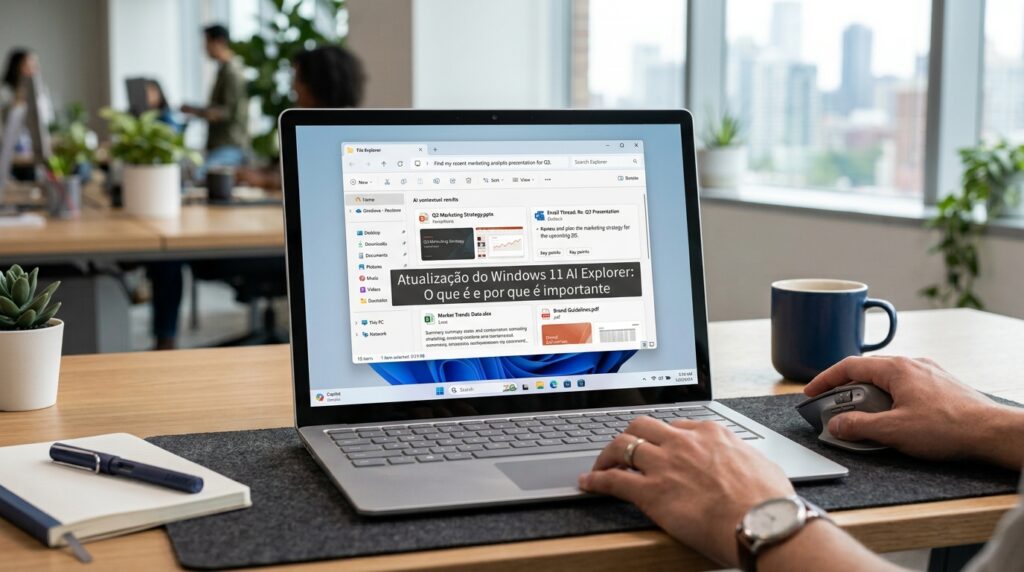
The Windows 11 AI Explorer update refers to Microsoft’s push to add AI-assisted discovery, context, and retrieval features inside the Windows 11 experience, most notably through the broader “Recall” and Copilot-era work tied to on-device AI. In practical terms, it is not just a cosmetic shell change. It is an attempt to make the operating system aware of what you did, what you opened, and what you may want to find again without forcing you to remember filenames, app paths, or exact timestamps.
This matters because Windows is moving from a system that mainly organizes files and apps to one that tries to interpret user activity. That shift changes search, privacy, hardware requirements, and even enterprise policy. If you manage endpoints, evaluate Copilot+ PCs, or simply care about whether AI belongs at the operating system layer, this update is strategically important rather than optional.
There is also a timing issue. Microsoft has been shipping AI features into Windows 11 in stages, and the terminology around “AI Explorer” has been messy enough that many users confuse concept, branding, and release status. The technical reality is more useful than the marketing label: Windows is building an AI-native layer around local inference, semantic indexing, and user activity reconstruction. That combination is powerful, but it also raises legitimate questions about trust, hardware compatibility, and whether the feature is truly ready for broad deployment.
Key Points
- The update is best understood as an AI-assisted activity recall and search layer for Windows 11, not a simple UI refresh.
- Its value comes from semantic retrieval: users can search by intent and context, not only by exact file names or folder paths.
- Local processing on Copilot+ PCs is central to the design, because Microsoft is trying to reduce latency and keep sensitive data on-device.
- Privacy and governance are not side issues; they are the main constraints shaping adoption in consumer and enterprise environments.
- The feature set has evolved under multiple names and rollout states, so deployment decisions should rely on current Microsoft documentation, not old blog headlines.
Windows 11 AI Explorer Update: What It is and Why It Matters
Technical Definition First, Marketing Second
Formally, the Windows 11 AI Explorer update is a set of AI-powered retrieval and context features designed to help Windows understand user activity at a semantic level. That means the system does more than index filenames; it attempts to capture relationships between apps, documents, browser sessions, and actions over time. In plain English, it tries to answer “what was I working on?” instead of only “where is that file?”
That distinction is critical. Traditional Windows Search works well when the user knows the target. AI-assisted retrieval works when the user remembers a fragment of context: a phrase in a document, a meeting topic, an image, or an app they used last Tuesday. This is a meaningful leap in usability, especially for knowledge workers who juggle dozens of windows and documents every day.
Why Microsoft is Pushing This Layer Into the OS
Microsoft’s strategy is clear: make Windows the operating system where AI is not a separate app, but a built-in interaction model. The company wants AI features to feel native to the shell, file system, and task flow. That is why you see emphasis on Copilot, local NPU acceleration, and on-device context awareness in the Copilot+ PC category.
From a product standpoint, this is a defensive and offensive move at the same time. It defends Windows against the risk of becoming a commodity desktop platform while browsers and cloud apps capture the intelligent workflow. It also creates a new reason to buy modern hardware, especially devices with dedicated neural processing units such as Qualcomm Snapdragon X, Intel Core Ultra, or AMD Ryzen AI systems.
What Changed Compared with Classic Search
Classic search is lexical. It matches text strings. Semantic search is contextual. It tries to infer meaning across sources. That matters because many user problems are not search problems in the old sense; they are memory problems. When someone says, “Find that slide about quarterly churn I edited after the client call,” a semantic layer has a chance of helping where filename search fails.
That said, this method works well for personal productivity, but it can fail in highly regulated environments, shared workstations, or cases where the local activity trail is incomplete. The more fragmented your workflow, the less reliable AI reconstruction becomes. No serious evaluator should ignore that limitation.
How the Feature Works Under the Hood
Semantic Indexing and Activity Snapshots
The core idea is semantic indexing: Windows collects structured signals from what you open, edit, view, and search, then creates a searchable representation of that activity. In many discussions, this is where people confuse the feature with plain browser history or ordinary file indexing. It is broader than both. The goal is to model the session itself, not just the artifact.
In practice, that means the system needs enough metadata to associate a user action with a time, application, and content fragment. If implemented well, the result can resemble a timeline of work. If implemented poorly, it becomes noise, duplicates, or stale references that users do not trust. Retrieval quality is everything here.
Local AI, NPU Hardware, and Copilot+ PCs
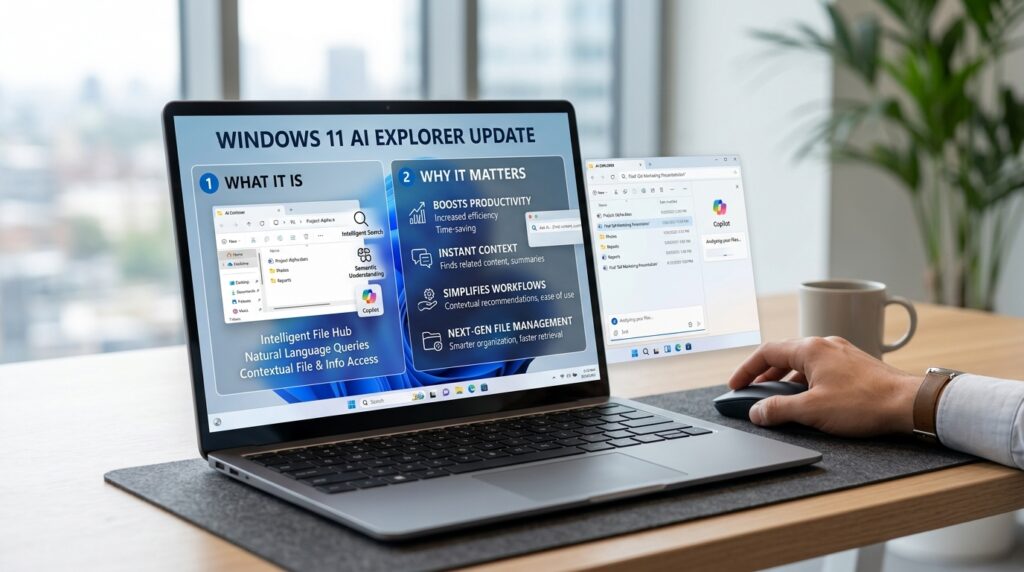
Microsoft has centered this feature around local AI acceleration, which is why Copilot+ PCs matter. The NPU (neural processing unit) handles inference workloads more efficiently than the CPU or GPU for certain tasks. That design reduces cloud dependence and lowers latency, two requirements that matter for responsiveness and privacy.
This hardware dependency is not a footnote. It is a filter. Devices without the right silicon may not get the same experience, the same performance, or the same feature availability. For IT teams, that creates a split fleet problem: some endpoints can use the new model natively, while others remain on conventional Windows search and indexing.
Where Recall Fits Into the Picture
Much of the public conversation around AI Explorer overlaps with Recall, Microsoft’s better-known activity capture feature. The branding has shifted, but the underlying design challenge has not: create a useful memory layer without crossing into unacceptable surveillance risk. That tension explains why Microsoft has revised security, enrollment, and rollout details more than once.
Relevant official material from Microsoft’s Windows Experience Blog is worth tracking because it reflects the feature’s current state better than third-party summaries. For the security posture behind this category of AI systems, the NIST AI Risk Management Framework is a useful reference point. And for deployment guidance in managed environments, Microsoft’s official documentation on Learn is the source of record.
Privacy, Security, and Governance Are the Real Story
Why This Feature Triggered Immediate Pushback
Any tool that records user activity by design will attract scrutiny, and this one did. The concern is not theoretical. If a system can reconstruct what a user saw and did across time, it becomes sensitive data by definition. That data can expose personal documents, internal projects, credentials on screen, or regulated information that should never be broadly accessible.
That is why the debate is not about “AI good or bad.” It is about data minimization, access control, retention, and user consent. Security teams will ask who can query the timeline, whether data is encrypted at rest, how long it persists, and whether an attacker can abuse the feature after gaining local access.
What Good Governance Looks Like
A serious rollout requires least-privilege access, clear opt-in behavior where appropriate, and strong local encryption. Admins should also verify whether the feature is disabled by default in their build, how policy interacts with Windows Hello, and whether enterprise controls can prevent unwanted capture. These are not optional checks; they are the basis of responsible deployment.
Vi cases in enterprise environments where a feature looked harmless in a demo and became controversial once employees understood the retention model. The pattern repeats: if users think the operating system is “watching everything,” adoption drops fast. The technical solution must therefore be paired with transparent communication and policy boundaries.
The Limits No One Should Ignore
This approach is not equally suitable for every organization. It can be useful on a personal laptop or a high-trust knowledge workstation, but it may be a poor fit for shared terminals, legal practices, healthcare settings, or environments with strict monitoring restrictions. There is divergence among specialists on whether the productivity gain justifies the privacy exposure for broad consumer deployment.
The practical rule is simple: if the user’s workflow depends on memory assistance, the feature can be valuable. If the user’s workflow depends on confidentiality or minimal data capture, the same feature becomes difficult to justify. Both positions are rational.
Who Benefits Most from the Update, and Who Should Be Cautious
Best Use Cases in Daily Work
Knowledge workers are the clearest beneficiaries. Writers, analysts, designers, consultants, and project managers often lose time reconstructing work across documents, browser tabs, and chat windows. An AI-powered history layer can reduce that overhead by turning vague recollection into a search query that actually works.
It also helps users who multitask heavily. If you regularly jump between Microsoft 365 apps, Edge, PDF tools, and messaging software, the system can potentially recover context faster than manual folder hunting. That is where the feature has real value: not in novelty, but in time saved over repeated work sessions.
Enterprise and IT Decision Factors
For IT leaders, the decision is less about convenience and more about risk, manageability, and hardware standardization. The first question is whether the organization can support the Copilot+ hardware baseline. The second is whether policy controls are mature enough to govern capture, retention, and user access. The third is whether the help desk is ready for new failure modes and support requests.
Security-conscious teams should test the feature in a pilot ring rather than opening it to the whole fleet. Measure user value, audit behavior, and document any compliance concerns. If the rollout depends on vague assurances, the organization is not ready.
Scenario Likely Benefit Main Risk Recommendation Personal productivity laptop Fast context recovery Local privacy exposure Test and tune permissions Enterprise knowledge worker device Search and recall efficiency Policy and retention complexity Pilot with governance controls Shared or regulated workstation Limited practical value High confidentiality risk Disable or tightly restrict
When the Feature is Not the Right Fit
Not every case benefits from AI-based recall. If a user already works inside a well-structured document system with strict naming conventions, the marginal gain may be small. If the environment is already monitored by DLP, VDI, or application control tools, the extra complexity may outweigh the benefit.
That is the nuance many vendor pitches skip. New capability does not equal new value. It has to solve an actual workflow pain point, and it has to do so without creating a larger control problem.
How to Evaluate the Update in Practice
Questions That Matter Before Deployment
Before treating this as a must-have feature, evaluate three things: availability, governance, and user demand. Availability means the hardware and Windows build are actually supported. Governance means policies, logs, and privacy settings are understood. User demand means the feature solves a problem people feel today, not one Microsoft hopes they will someday notice.
Use a short pilot with real workflows, not a demo script. Have testers try to recover documents, browser activity, and app sessions from memory-based prompts. If the feature saves time only in artificial scenarios, it is not ready for broad adoption.
Metrics Worth Tracking
Track task completion time, failed retrievals, help desk tickets, and opt-out rates. Those indicators tell you more than marketing claims. A feature that looks impressive but produces low trust will not survive contact with daily use.
In practical deployments, adoption rises only when users see consistent wins in the first week. If recall results feel random, they stop using it. Search technology lives or dies by precision and predictability, not by AI branding.
What the Next Phase Likely Looks Like
The next phase of Windows 11 AI features will probably blend on-device memory, cloud-backed Copilot capabilities, and richer app integration. Microsoft wants the OS to serve as a context engine. That direction is logical, but it also means every release will need stronger guardrails, not fewer.
My view is firm: this category will matter long term, but only if Microsoft treats trust as a product feature, not a compliance checkbox. The companies that win here will be the ones that make users feel in control of the memory layer, not trapped by it.
Como Aplicar Esse Conhecimento
For individuals, the right move is to evaluate the feature against your actual workflow, not against the hype cycle. If you spend your day reconstructing work across apps and documents, the update may save meaningful time. If your files are already organized and your privacy expectations are strict, disable it or keep it out of your primary setup.
For organizations, the best path is controlled adoption: verify supported hardware, review Microsoft’s current documentation, align with security policy, and run a narrow pilot before broad rollout. The strategic question is not whether AI belongs in Windows. It is whether the operating system can become more useful without becoming less trustworthy.
FAQ
Is AI Explorer the Same Thing as Recall in Windows 11?
They are closely related in concept, but the naming has shifted across Microsoft’s AI roadmap. The practical overlap is activity-based search, semantic context, and memory-like retrieval on Windows 11. In professional terms, it is safer to think of AI Explorer as part of the broader recall and Copilot+ experience rather than a completely separate product. Always verify the current Microsoft release notes before assuming feature parity.
Does the Feature Require Special Hardware?
In its modern form, yes, hardware matters a lot. Microsoft has tied the best experience to Copilot+ PCs with an NPU that can handle local AI workloads efficiently. Devices without that acceleration may not support the same feature set or performance level. For procurement teams, this means the update is partly a software decision and partly a hardware strategy.
What is the Biggest Security Concern?
The biggest concern is the creation of a searchable record of user activity. If poorly governed, that record can expose sensitive content, internal projects, or personal data seen on screen. The risk is not just external compromise; it is also inappropriate local access and weak retention controls. Security teams should evaluate encryption, access policy, and auditability before deployment.
Can Enterprises Disable or Restrict It?
In enterprise environments, policy control is the difference between a useful feature and a liability. Administrators should review Microsoft’s documentation for the exact control surface available in the current build, because feature governance has changed across previews and releases. The safest assumption is that restrictions may exist, but the exact behavior depends on Windows edition, device type, and rollout state.
Is This Feature Actually Useful in Day-to-day Work?
Yes, but only for the right workflow. It is most useful when users need to recover a document, site, or app state from memory rather than from a known file path. It is less valuable in highly structured environments where conventional search already works well. The real test is whether it reduces friction on real tasks, not whether it looks impressive in a demo.
Editorial Notice
This content was structured with the assistance of Artificial Intelligence and subjected to rigorous curation, fact-checking, and final review by Editor-in-Chief Nivailton Santos. TechTool Judge reaffirms its unyielding commitment to journalistic ethics, ensuring that editorial judgment and data validation remain entirely under human responsibility and final editorial oversight.