
Apple Debuts Revamped 'Siri AI' and New Child Safety Features


Apple Debuts Revamped Siri AI and New Child Safety Features signals two parallel moves that matter for both consumers and the broader tech industry: a more capable, context-aware assistant built around on-device and cloud-assisted AI, and a tightened set of protections designed to reduce the risks children face across Apple’s ecosystem. In technical terms, this is a product and policy update that combines generative assistant behavior, personal context, and safety controls spanning iPhone, iPad, macOS, and family-account tooling. In plain English, Apple is trying to make Siri more useful without loosening control over privacy, age-appropriate access, or parental oversight.
The timing is not accidental. Voice assistants have been under pressure since large language models raised the bar for natural conversation, task completion, and recall. At the same time, regulators, parents, and schools keep pushing platforms to do more on child safety, content moderation, and account integrity. Apple’s answer is notable because it leans into its long-standing privacy position instead of copying a fully cloud-first model. That trade-off shapes everything from latency to personalization to what the assistant can safely do when children are involved.
There is also a strategic layer here. Siri has spent years as a competent but underwhelming assistant, especially compared with newer AI products that can plan, summarize, and act across apps. A revamped Siri changes that narrative only if Apple delivers reliable execution across Apple Intelligence, device permissions, and developer integrations. The child safety features matter for the same reason: they are not just a compliance layer, but a trust mechanism that can determine whether families keep using Apple devices as the default environment at home.
Pontos-Chave
- Apple’s updated Siri is best understood as a hybrid AI system: part on-device processing, part private cloud computation, with a stronger focus on context and action.
- The child safety update is not a single setting; it is a layered framework involving account age signals, parental controls, communication permissions, and content restrictions.
- The practical test is execution quality, not marketing language. A smarter assistant only matters if it can complete tasks accurately across first-party apps and protected contexts.
- Apple’s privacy model is a real differentiator, but it also creates constraints that can limit how aggressively Siri can personalize or infer intent.
- Family safety features usually work best when they are defaulted correctly, because most households do not configure advanced controls after setup.
Apple Debuts Revamped Siri AI and New Child Safety Features: What Changed and Why It Matters
Siri Moves from Reactive Assistant to Context-Aware System
The technical shift in Siri is from command-response behavior toward context-aware orchestration. That means the assistant is no longer judged only by whether it understands a request; it is judged by whether it can connect the request to the current app state, the user’s identity, and the allowed actions on the device. In the AI field, this is the difference between a conversational front end and an execution layer that can interpret intent, retrieve relevant context, and take bounded action.
In practice, that is where users feel the difference. A useful assistant should know whether “send this to Mom” refers to a photo, a document, or a map location already on screen. If Siri can do that consistently, it becomes more than a voice interface. It becomes a practical interface for the operating system itself. That is the real benchmark, and it is much harder than generating polished text.
Apple’s revamped Siri AI matters because Apple controls the full stack: silicon, operating system, permissions, and default apps. That gives it an advantage over competitors that have to behave like guests inside another company’s ecosystem. The limitation is equally important: Apple has to preserve user trust while making the assistant feel powerful. Those two goals often pull in opposite directions.
Child Safety Features Are Built as Guardrails, Not Afterthoughts
Apple’s child safety approach should be read as an architecture of guardrails. The system uses account age-related signals, Family Sharing, Screen Time, communication limits, and content classifications to reduce exposure rather than rely on a single moderation filter. This is the right model. Children do not encounter risk in one place; they encounter it across messages, app discovery, media, contacts, and shared devices.
That layered design matters because families live with exceptions. A child may need to message a classmate, access a homework app, or watch a school-approved video, all while being blocked from other contacts or content. A one-size-fits-all rule breaks quickly in those scenarios. Apple’s challenge is to make the controls granular enough to be useful and simple enough that parents actually use them.
Vi casos em que families abandon strong controls not because they dislike them, but because the setup is too confusing or the exceptions are too hard to manage. That is a common failure mode in consumer safety design. The best safeguard is the one that survives ordinary household chaos, not the one that looks strongest on a feature list.
Why This Update Lands at a Sensitive Moment
Apple is pushing these updates during a period of high scrutiny around AI reliability, youth safety, and platform responsibility. Regulators are watching how major technology companies handle personal data, minors’ accounts, and algorithmic decision-making. At the same time, users now expect AI features to be genuinely helpful, not just decorative. Those expectations compress the acceptable error rate.
That pressure creates a difficult product equation. If Apple moves too conservatively, Siri will continue to lag. If it moves too aggressively, privacy and safety critics will immediately question the system’s judgment. The update is therefore less about novelty and more about proving that a consumer AI assistant can be both capable and controlled.
For readers evaluating the significance of the announcement, the key question is simple: does Apple’s approach reduce friction without expanding risk? If the answer is yes, the update could become one of the more durable AI implementations in consumer computing. If not, it will join the long list of assistant redesigns that sounded more advanced than they behaved.
How Siri AI Works Under Apple’s Privacy-First Model
On-Device Intelligence, Private Cloud, and the Execution Boundary
Apple’s AI stack is built around a boundary between on-device processing and private cloud augmentation. On-device inference handles tasks that can be executed locally, which reduces latency and keeps many interactions tied to the hardware itself. For more complex requests, Apple can route work through controlled cloud infrastructure. This hybrid model is technically conservative, but it is the right choice for a company that treats privacy as a product feature rather than a legal footnote.
The reason this matters is that assistant quality is not just about model size. It is about where the computation happens, what data is exposed, and how much context the system can legally and safely use. A cloud-only assistant may feel broader in scope, yet it can also raise immediate concerns about persistence, profiling, and error surface area. Apple is betting that users will accept slightly narrower flexibility in exchange for stronger local control.
That bet is not guaranteed to win every category. When tasks require cross-app memory, complex reasoning, or access to external services, a privacy-first approach can hit limits faster than competitors expect. This method works well for routine consumer workflows, but it can struggle where third-party integrations or deep conversational continuity matter most.
App Intents, Personal Context, and System-Level Actions
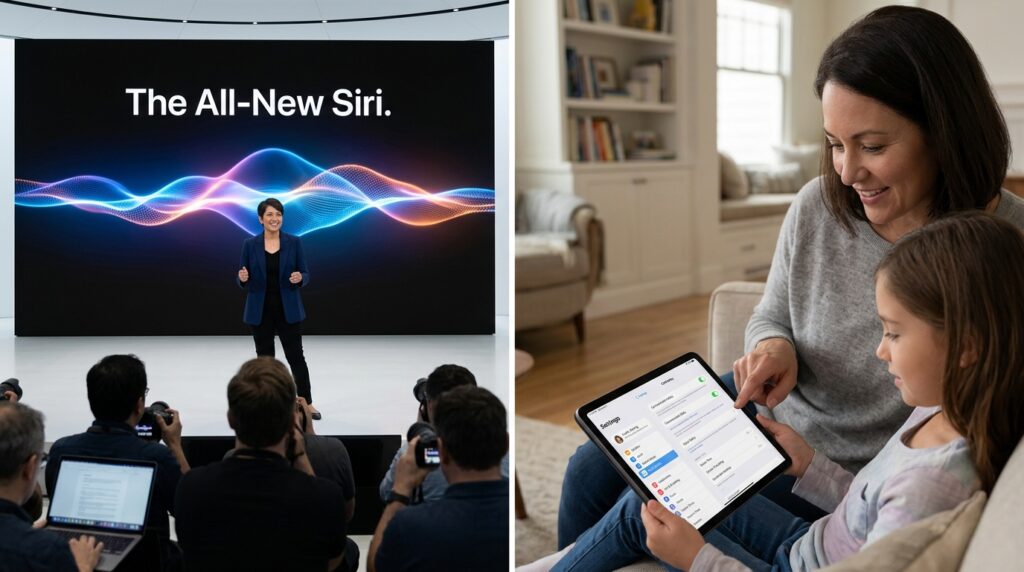
The meaningful upgrade is not just conversational fluency; it is system-level action. Apple’s framework increasingly relies on app intents, which define what an app can safely expose to Siri without opening the door to arbitrary access. That is how the assistant can remain useful while avoiding the kind of unrestricted automation that creates security and privacy risks.
Personal context is the other major layer. In technical terms, this means the system can use relevant user-specific information—such as calendar entries, recent files, or app state—to resolve ambiguous requests. In practical use, that reduces the need for users to repeat themselves. It also raises the quality bar, because the assistant must be accurate about identity, timing, and permission boundaries.
Apple Intelligence is the umbrella that ties this together, but the real value lives in the details: permission checks, app entitlement design, and how fast the assistant can interpret a request without leaking context across profiles. That is where polished marketing ends and actual engineering begins.
Why Developers Should Care About the New Assistant Layer
For developers, the important shift is that the assistant becomes more visible as an operating layer above apps. If Siri can correctly invoke app-specific actions, then developers who expose well-designed intents gain a distribution advantage inside Apple’s ecosystem. If they do not, their apps remain isolated islands while native services keep the best assistant integration.
This changes product design decisions. Teams will need to think about action verbs, permission surfaces, and predictable outcomes, not just user interface polish. Apps that support clean intent definitions are more likely to benefit from assistant-driven discovery and task completion. Apps that do not will look increasingly opaque as assistant-based workflows become the default expectation.
Child Safety Features in Apple’s Ecosystem: Controls, Trade-Offs, and Limitations
Family Sharing and Screen Time Form the Control Center
Apple’s child safety model depends heavily on Family Sharing and Screen Time because these systems give parents practical control over how a device is used. Family Sharing links accounts into a managed household structure, while Screen Time handles app limits, downtime, content restrictions, and usage monitoring. Together, they form the administrative core of Apple’s family-safety stack.
In real households, the power of these tools depends on defaults. A parent does not want to micromanage every permission after each software update. They need a stable framework that survives device changes, school schedules, and shared media libraries. That is why setup quality matters as much as feature breadth. An elegant feature that gets disabled during onboarding fails as a safety tool.
Apple’s challenge is to maintain simplicity without flattening nuance. Families differ, and children of different ages require different guardrails. Strong child safety design should make it easy to tighten controls for younger users while preserving some autonomy for teens. If the system gets too rigid, families will work around it.
Communication Limits, Content Filters, and App Access Rules
The most meaningful safety controls typically involve who a child can contact, what content they can access, and which apps they can install or use. Communication Limits reduce unwanted contact. Content filters block adult or age-inappropriate material. App access rules help prevent installation of apps that do not match the child’s age range or family policy.
These tools are more effective when they work together. A child who cannot install a risky app but can still receive a link to harmful content is not fully protected. Likewise, blocking media without managing contacts leaves another path open. The best systems assume risk travels through multiple channels, not one.
That said, no platform can eliminate every edge case. Shared iPads, older siblings, school-issued accounts, and third-party messaging platforms can all complicate enforcement. There is divergence among specialists about how far platform-level controls should go before they start interfering with legitimate autonomy and educational use. The balance is not fixed; it depends on age, context, and family norms.
What Parents Should Understand Before Relying on Defaults
Defaults are helpful, but they are not a substitute for periodic review. A child’s permission profile should change as their responsibilities change, and Apple’s tools only work well when someone checks the settings after major software updates or school transitions. The most common mistake is assuming that a good setup on day one stays good indefinitely.
Parents should also distinguish between content filtering and behavior management. Filtering controls what appears on the device. Behavior management controls when, how long, and with whom the device is used. Both matter. One without the other creates blind spots.
Apple’s Family Sharing and Screen Time documentation is still the best starting point for understanding how these controls are intended to work. For policy context, the U.S. Federal Trade Commission remains a useful reference on child privacy and online protections, while NIST offers technical guidance on risk management and security controls.
What This Means for Users, Families, and the Competitive Landscape
For Consumers, Reliability Will Matter More Than Novelty
Consumers will judge the revamped Siri by one standard: does it save time without creating confusion? If the assistant can handle routine requests, surface relevant context, and act across apps without repeated corrections, users will notice immediately. If it stumbles, they will revert to tapping and typing, which is what has happened with previous assistant upgrades across the industry.
That is why the user experience has to feel consistent across devices. iPhone, iPad, Mac, and Apple Watch all need to present a coherent assistant model, not a patchwork of partially capable features. A good AI assistant disappears into the workflow. A bad one makes the user manage the assistant instead of the task.
For Families, Better Safety is Valuable Only If It Stays Usable
Child safety features matter when they reduce daily friction rather than add to it. Families want controls that support good habits without constant technical babysitting. The strongest signal Apple can send is that safety and convenience do not have to be opposites. But if controls become too rigid or obscure, many households will treat them as optional rather than foundational.
Na prática, o que acontece é que parents tend to use the features that are easiest to understand and ignore the rest. That is why clear onboarding, trustworthy defaults, and visible status indicators matter so much. Adoption follows usability. Safety teams know this, even when product pages do not say it out loud.
For Competitors, Apple is Raising the Baseline
Apple’s move pressures rivals in two directions at once. First, it raises the quality bar for consumer assistants by making context, action, and privacy part of the same discussion. Second, it normalizes the idea that child safety should be integrated into core product design, not hidden in a settings submenu or deferred to optional parental software.
Competitors that rely heavily on cloud AI will need to justify their trade-offs more clearly. Competitors with weaker family-safety tooling will need to catch up fast. Once a major platform demonstrates a credible combination of assistant intelligence and safety architecture, users start to expect that combination everywhere else.
Próximos Passos Para Implementação
The right way to evaluate this release is to treat it as an ecosystem shift, not a feature checklist. Siri’s success depends on execution quality across permissions, app intents, and private computation. The child safety layer depends on whether the controls are discoverable, durable, and age-appropriate. In both cases, the real value will show up in day-to-day use, not in launch-day language.
Organizations that support families, schools, or device fleets should test these features against actual workflows: shared calendars, homework apps, messaging permissions, and account transitions across age bands. Consumer products often look strong in demos and weak in households. The gap closes only when the design survives repetitive, messy, real-world use.
For users and IT teams alike, the next move is to verify settings, review permissions, and measure whether the new Siri genuinely reduces manual steps. That is the standard that matters. If the assistant and the safety framework both hold up under normal use, Apple will have done more than refresh branding; it will have set a new expectation for how AI and child protection should coexist in a mainstream device ecosystem.
FAQ
What is the Technical Significance of Apple’s Revamped Siri AI?
The technical significance is that Siri is moving toward a context-aware orchestration layer rather than a simple voice command tool. That means it can use app state, personal context, and permissioned actions to complete tasks more intelligently. The important distinction is execution, not just conversation: a better model matters only if it reliably performs the right system action under the right permissions.
How is Apple’s AI Approach Different from Cloud-first Assistants?
Apple uses a hybrid model that combines on-device processing with private cloud computation for harder requests. This lowers some privacy risk and keeps many interactions local, but it can also limit how much context the assistant can use compared with cloud-first systems. The trade-off is deliberate: Apple is prioritizing control and trust over maximum flexibility.
Which Child Safety Controls Matter Most in Apple’s Ecosystem?
The most important controls are Family Sharing, Screen Time, Communication Limits, and age-based content restrictions. Those features work together to manage who a child can contact, what they can access, and how long they can use the device. If they are configured well, they cover more real-world risk than a single content filter ever could.
Do Apple’s Child Safety Features Eliminate All Risk for Families?
No platform can eliminate all risk, and Apple’s tools are no exception. They reduce exposure inside Apple’s ecosystem, but shared devices, third-party apps, older sibling accounts, and external services can still create gaps. The safest setup is one that gets reviewed periodically and adjusted as the child’s age and digital habits change.
Why Do These Updates Matter for Apple’s Competitive Position?
They matter because Apple is linking AI capability with privacy and family safety in one product story. That combination is harder to copy than a standalone chatbot or a simple parental-control app. If the rollout is reliable, it can reset expectations for what a premium consumer platform should deliver across intelligence, trust, and household management.
Editorial Notice
This content was structured with the assistance of Artificial Intelligence and subjected to rigorous curation, fact-checking, and final review by Editor-in-Chief Nivailton Santos. TechTool Judge reaffirms its unyielding commitment to journalistic ethics, ensuring that editorial judgment and data validation remain entirely under human responsibility and final editorial oversight.