
Microsoft Surface Pro 13 leak reveals Snapdragon X2 Elite version

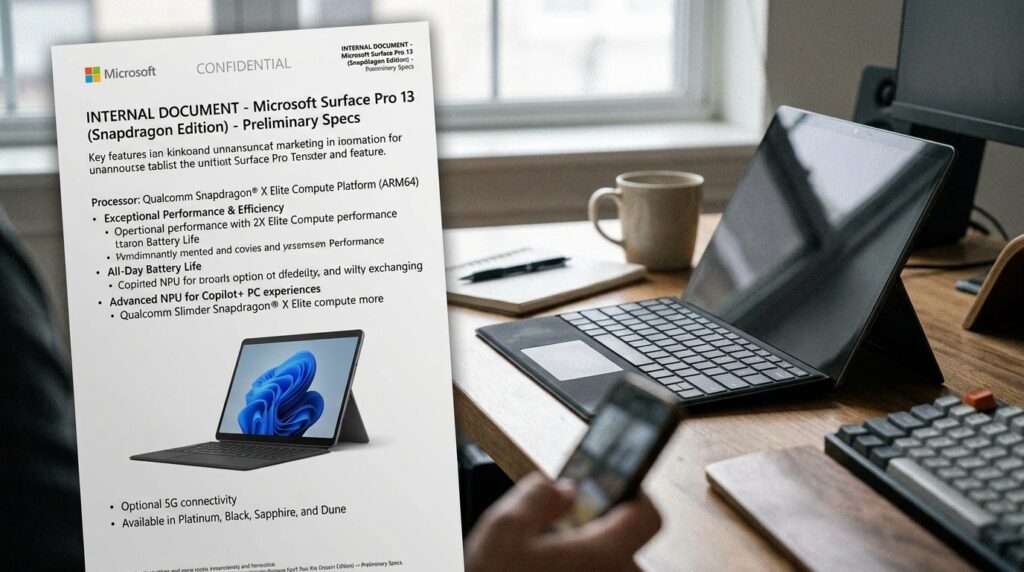
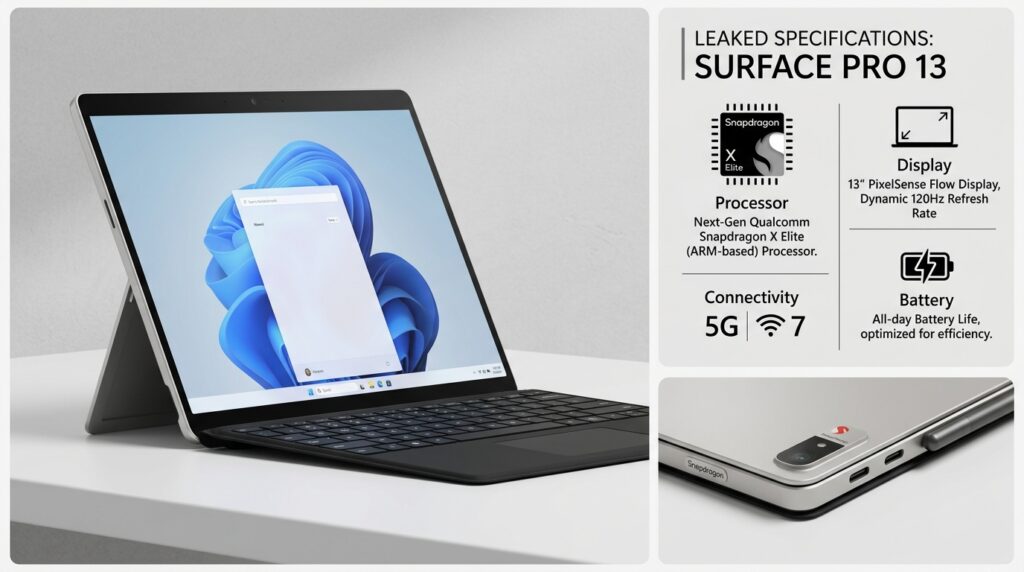
Microsoft Surface Pro 13 leak reveals Snapdragon X2 Elite version is the clearest signal yet that Microsoft is preparing a serious consumer-facing shift toward Qualcomm’s ARM platform. In practical terms, the leak points to a 13-inch Surface Pro built around a next-generation Snapdragon X2 Elite chip, a design aimed at better battery efficiency, stronger on-device AI, and lower thermal overhead than many traditional x86 ultraportables.
This matters now because Microsoft is no longer treating ARM as an experimental branch for niche users. The Surface line has been the company’s hardware laboratory for years, and when a retail listing surfaces detailed images, likely specs, and packaging language, it usually reflects a product that is far enough along to define Microsoft’s near-term strategy. If the leaked configuration holds, this device is not just another refresh; it is part of a broader reset in how Windows notebooks are built, marketed, and used.
The timing is also important because the Windows-on-ARM story has matured. Microsoft has spent years improving app compatibility, Qualcomm has pushed performance and NPU capabilities forward, and buyers have become less tolerant of battery-heavy, fan-loud ultrabooks that still struggle with modern AI workloads. That is why this leak deserves attention: it says more about where the category is going than about a single tablet-shaped PC.
Key Takeaways
- The leak suggests Microsoft is moving the consumer Surface Pro line fully into Qualcomm ARM territory, which changes performance, battery, and software compatibility expectations at the same time.
- The Snapdragon X2 Elite appears to be positioned as an AI-first mobile chip, so the real story is not just raw speed but local inference, thermal efficiency, and always-connected behavior.
- A 13-inch Surface Pro built around ARM will likely appeal most to people who value portability, silence, and battery life over legacy x86 flexibility.
- Compatibility is better than it used to be, but professional users with specialized drivers, older plug-ins, or niche enterprise tools still need to test before adopting.
- This leak signals a broader Windows hardware transition, not just a single product launch.
Microsoft Surface Pro 13 Leak Reveals Snapdragon X2 Elite Version: What the Retail Listing Really Means
A Retail Leak is Not a Rumor; It is an Early Product Signal
In hardware reporting, a large retail leak is more valuable than a speculative benchmark post because it usually contains packaging, product naming, and configuration details that have passed through commercial channels. A store listing does not guarantee every spec is final, but it almost always indicates that the product has entered the late-stage launch pipeline. That is why the Surface Pro 13 leak matters: it is not a vague claim about “something coming soon,” but a structured indication of what Microsoft intends to ship.
When retailers post images and feature bullets, they tend to mirror the messaging the vendor wants on day one. That means the leak can reveal positioning as much as hardware. Here, the messaging appears to point toward a consumer-optimized Surface Pro, not an enterprise-only pilot, with Qualcomm ARM as the core differentiator. That lines up with Microsoft’s long-term push to make Windows feel native on efficient mobile silicon rather than merely adapted to it.
Why the 13-inch Format is Strategically Important
The 13-inch class sits in the sweet spot for a detachable 2-in-1. It is large enough for productivity, note-taking, and light creative work, but still small enough to preserve tablet usability. For Surface, this format has always been about compromise in the best sense: laptop when docked, slate when detached, and a middle ground that can satisfy both students and mobile professionals. A 13-inch ARM-based model makes even more sense because thinner thermal budgets favor fanless or low-noise designs.
That design choice also reflects a market reality. The people most likely to buy a Surface Pro do not need desktop-class expandability; they need a device that starts instantly, lasts through a workday, and can handle video calls, Office, cloud apps, and increasingly, local AI features. The leak tells us Microsoft is betting that the category now rewards efficiency and responsiveness more than legacy compatibility at any cost.
What to Treat as Confirmed, and What to Treat Cautiously
It is reasonable to treat the chassis size, ARM direction, and retail positioning as highly credible once a major chain has posted them. It is not reasonable to assume every internal component, final clock behavior, or exact battery figure is locked. Leaks often capture marketing-ready information first and engineering-final detail second. That distinction matters because launch-day performance can still differ from pre-release material.
That is also where discipline matters. I have seen cases where a retail leak described a compelling device, but the final shipping model changed the RAM tiers, display calibration, or storage configuration in subtle ways that affected real-world value more than headline specs. So the leak should be read as a strong directional map, not a contract. The direction is clear; the fine print is still under revision.
Why Qualcomm’s Snapdragon X2 Elite Changes the Surface Equation
Technical Definition: ARM Client SoC with Integrated CPU, GPU, and NPU
Formally, the Snapdragon X2 Elite is best understood as a client system-on-chip designed for Windows PCs using ARM instruction set architecture. In plain English, it combines the central processor, graphics processor, and neural processing unit into one highly integrated package, with a focus on power efficiency and on-device AI acceleration. That integration reduces overhead, simplifies thermals, and allows the machine to devote more of its power envelope to useful work instead of heat management.
This is the core reason ARM matters in a device like Surface Pro. Traditional x86 laptops often win on broad software compatibility, but they usually pay for it with higher idle draw, heavier cooling requirements, and less graceful battery behavior under mixed workloads. ARM flips that equation when the software stack cooperates. Microsoft has spent years improving that stack, and Qualcomm has been closing the performance-per-watt gap that used to hold ARM notebooks back.
The NPU is Not a Marketing Badge Anymore
The most important part of the Snapdragon X2 Elite story may be the NPU, not the CPU. An NPU, or neural processing unit, accelerates machine-learning tasks locally instead of sending every request to the cloud. That matters for features like image enhancement, transcription, background blur, semantic search, and future Copilot+ experiences. It also reduces latency and can improve privacy because data stays on the device for more of the workflow.
Qualcomm’s current trajectory suggests the NPU is becoming a first-class component, not a side feature. For Microsoft, that is a strategic fit: Windows is adding more AI-assisted functions, and hardware that can run them locally gives the company more control over speed, battery impact, and user experience. The important nuance is that local AI works best for frequent, lightweight tasks; bigger generative workloads still benefit from cloud scale.
Windows on ARM is Stronger Than It Was, but Not Frictionless
The compatibility story has improved a lot, and that improvement is part of why this leak is credible as a mainstream product strategy rather than a niche experiment. Microsoft’s emulation layer now handles a wider range of x86 applications than it did in earlier generations, and more developers are compiling native ARM builds. For Office, Edge, Teams, browser-based workflows, and many modern creative apps, the experience can now be excellent.
Still, there is a hard ceiling on compatibility risk. Apps that depend on specialized kernel drivers, older VPN clients, niche peripherals, or deeply embedded plug-ins can still create problems. The device may run the app, but not the stack around it. That is why the best Windows-on-ARM advice is practical, not ideological: if your workflow is mainstream, the platform is increasingly attractive; if your workflow depends on hardware dongles or legacy software, test first.
For a technical reference point, Microsoft’s own Windows-on-ARM documentation remains the most useful baseline: Windows on ARM documentation. Qualcomm’s platform overview is also useful for understanding the chip family’s direction: Snapdragon PC platforms.
What the Surface Pro 13 Hardware Strategy Suggests About Performance, Battery, and AI
Battery Life Should Improve, but the Real Win is Sustained Efficiency
Most buyers focus on battery number claims, but sustained efficiency is more important. A device can post a nice headline runtime in a light office test and still feel poor if it drains quickly under video calls, browser tabs, and background sync. ARM’s advantage is usually not one giant leap in peak speed; it is the ability to stay responsive under mixed workloads without forcing the fan and power budget to work overtime. That is where the Surface Pro form factor benefits most.
In a detachable device, heat matters as much as battery. A hot tablet feels worse in the hand, throttles sooner, and becomes less comfortable for lap use. If Microsoft and Qualcomm tuned the X2 Elite correctly, the Surface Pro 13 should behave more like a premium mobile appliance and less like a shrunk-down laptop trying to survive tablet mode. That would be a meaningful product improvement, not just a spec sheet win.
Display, Thermals, and Pen Input Will Define the Experience
Surface buyers do not judge these products by silicon alone. They judge them by how the display behaves in bright rooms, how quickly the pen responds, whether touch latency feels natural, and whether the chassis stays quiet during long sessions. If the leaked 13-inch model keeps the usual Surface identity—sharp panel, thin kickstand, good touch support, and strong inking—it could be one of the most coherent ARM tablets in Windows land.
That said, display quality and thermal tuning often matter more than chip branding. A great SoC can be undermined by poor panel calibration, aggressive power management, or sluggish firmware. The Surface team knows this, and that is why the leak should be read as a system story, not a processor story alone. Buyers should care about the whole stack: panel, battery, thermal design, keyboard, pen, and software optimization.
Area Why It Matters on Surface Pro 13 What to Watch at Launch CPU / SoC Determines sustained responsiveness and battery behavior Real-world app speed, not just peak benchmarks NPU Runs on-device AI tasks with lower power draw Which Copilot+ features are actually enabled Thermals Controls noise, comfort, and throttling Fan behavior under conferencing and multitasking Software stack Determines compatibility and day-to-day reliability Native ARM app support for your core workflow
Copilot+ Positioning is Likely Central to the Launch
Microsoft has been steering its newest PCs toward AI-first branding, and this device fits that direction. A Surface Pro with a strong NPU is a natural candidate for local AI features that Microsoft can bundle into Windows and Surface services. In market terms, that gives the product a clearer identity than “just another thin tablet PC.” It becomes a platform for assistant features, transcription, image processing, and smarter productivity tools.
That strategy makes sense, but it also creates pressure. Users now expect AI features to be useful, fast, and not gimmicky. If those features feel bolted on, the hardware premium becomes harder to justify. If they feel integrated into everyday work, Microsoft has a stronger story than the usual “slimmer and faster” laptop pitch.
Who This Device is for, and Who Should Be Careful
The Best Fit: Mobile Professionals, Students, and AI-first Workflow Users
This kind of Surface is likely ideal for people who live in browsers, Microsoft 365, note-taking apps, conferencing tools, and cloud-connected workflows. Students benefit from the lightweight format and pen support. Consultants and field workers benefit from battery life, standby behavior, and instant wake. Teams that are already aligned with Microsoft’s ecosystem tend to see the cleanest payoff because the platform is built around those workflows.
It also makes sense for users who want a premium Windows device that feels more like a tablet than a traditional clamshell. The kickstand, detachable keyboard, and pen input still differentiate Surface in a crowded market. If the ARM implementation is solid, this could be one of the rare Windows devices that feels optimized for mobility rather than merely smaller.
The Risky Fit: Legacy Software, Custom Drivers, and Specialized Peripherals
Anyone dependent on older desktop software should be cautious. That includes users of custom accounting tools, industrial software, specific USB peripherals, niche audio interfaces, or enterprise VPN and endpoint agents that were never updated for ARM. In those environments, the issue is not just “will the app open?” but whether the full chain of authentication, drivers, and plugins works reliably. That is where ARM adoption still demands testing.
There is no honest way around that limitation. The compatibility layer has improved, but it does not turn every old dependency into a native ARM citizen. Some buyers can accept that tradeoff because their apps are mainstream. Others cannot because their business depends on one fragile tool chain. That difference should drive the buying decision more than raw enthusiasm for new silicon.
For professionals, the right question is not whether ARM laptops are “good enough” in the abstract. The right question is whether the exact applications, drivers, and security tools in the workflow are verified on Windows on ARM before the purchase is made.
How This Compares with the Current Windows PC Market
The broader market is now split between legacy x86 machines that prioritize compatibility and ARM devices that prioritize efficiency, quiet operation, and AI features. Intel and AMD still matter, especially in environments with heavyweight desktop software, but Microsoft is clearly trying to shift the center of gravity. If this Surface Pro launches successfully, it will reinforce the idea that ARM is not an alternative path; it is becoming the preferred path for many mainstream users.
There is some divergence among specialists about how fast that transition will happen. Some argue compatibility friction will slow adoption for years. Others point to the pace of software porting and the clear battery advantages as evidence that the transition is already underway. The reality is in the middle: the platform is mature enough for mainstream mobility, but not universal enough for every workflow.
For additional context on the underlying platform evolution, Qualcomm’s release materials and Microsoft’s documentation are the most stable references, while broader coverage from publications like The Verge helps track how real users and reviewers are responding once devices ship.
How to Apply This Information Before Buying or Recommending the Device
Use a Workload-first Checklist, Not a Spec-sheet Reaction
If you are evaluating this Surface for personal use or for a team rollout, start with the workload. List the exact apps, browser extensions, peripherals, VPNs, and cloud tools the device must support. Then test those items on a known-good Windows on ARM system if possible. That process is far more useful than comparing synthetic benchmarks, because the biggest wins here will come from battery life, standby behavior, and a smoother AI-enabled workflow.
This approach also prevents overbuying. A faster chip is not automatically a better purchase if the software stack is light. Likewise, a lower-powered ARM device can outperform a heavier x86 laptop in real life if it lasts longer and stays cool during the tasks that matter. The point is fit, not bragging rights.
Watch for Launch-day Details That Change the Value Equation
Three launch details will matter more than marketing language: RAM tiering, storage configuration, and whether Microsoft exposes the full set of AI features on day one. RAM determines how comfortably the machine handles multitasking and browser-heavy work. Storage affects speed, longevity, and price. AI feature availability tells you whether the device is being sold as a real platform upgrade or as a forward-looking promise.
Price will also matter, but it should be read in context. A premium Surface can be justified if the battery life, input quality, and software experience are strong enough. If the launch premium is high and the real-world advantage is modest, buyers should wait. That is the disciplined way to interpret a leak: not as an invitation to speculate, but as a prompt to prepare a decision framework before reviews arrive.
Strategic Takeaway for Teams and Power Users
The strongest reading of this leak is that Microsoft wants Surface to lead the Windows ARM transition in a way consumers can actually feel. That means better mobility, quieter operation, and more useful on-device AI. It also means some buyers will need to become more selective about software compatibility than they have been with traditional x86 laptops. In enterprise and prosumer settings, that tradeoff can be acceptable if the deployment is planned carefully.
My view is direct: if your daily work is modern, cloud-connected, and mostly mainstream, this class of device could be one of the best Windows form factors available. If your workflow depends on old drivers or specialized local apps, wait for verified compatibility data before moving. That is the difference between adopting a genuinely better device and buying into a transition before it fits your environment.
Próximos passos para implementation means treating the leak as a decision input, not a purchase trigger. Verify software support, compare battery claims with independent reviews, and track whether Microsoft’s AI and ARM messaging matches the real shipping model. If the final unit delivers what the leak suggests, the Surface Pro line may be entering its most important redesign in years.
Frequently Asked Questions
Is the Snapdragon X2 Elite Likely to Be Faster Than the Previous Surface Generation?
In raw architectural terms, yes, the Snapdragon X2 Elite should deliver a meaningful step forward in efficiency and AI throughput, and likely better sustained performance in thin designs. The more important question is not peak speed but how it behaves under long sessions of multitasking, video calls, and browser-heavy work. Final shipping performance will depend on Microsoft’s power tuning, cooling, and memory configuration, so launch-day reviews will still matter.
Will Windows Apps Run Normally on a Surface Pro Built on ARM?
Most mainstream apps should run well, especially if they are native ARM builds or modern software with good emulation support. Problems are more likely with older tools, custom drivers, security software, and niche peripherals. If a workflow depends on specialized legacy software, it should be tested on Windows on ARM before any purchase decision is made.
Does a Stronger NPU Change Everyday Use, or is It Just for AI Demos?
A capable NPU changes everyday use when the operating system and apps actually tap into it for local tasks like transcription, background effects, image cleanup, and semantic search. That reduces latency and can help battery life because those tasks do not need the main CPU to stay busy. It becomes valuable when the software stack uses it consistently, not just during showcase moments.
Should Buyers Wait for Reviews Before Considering This Model?
Yes, especially if the device will replace a primary work machine. Leaks can reveal direction, but they do not prove thermal behavior, battery endurance, or compatibility with real apps and peripherals. A Surface on ARM can be excellent for the right user, but the final verdict depends on the shipping firmware, price, and the quality of Microsoft’s software integration.
Who Benefits Most from a 13-inch ARM Surface Pro?
People who want a portable Windows device for productivity, note-taking, conferencing, and cloud-based work are the best fit. Students, mobile professionals, and users already invested in Microsoft 365 tend to gain the most. Power users with legacy Windows dependencies should be careful, because the platform’s strengths are now clear, but its compatibility ceiling still exists.
Editorial Notice
This content was structured with the assistance of Artificial Intelligence and subjected to rigorous curation, fact-checking, and final review by Editor-in-Chief Nivailton Santos. TechTool Judge reaffirms its unyielding commitment to journalistic ethics, ensuring that editorial judgment and data validation remain entirely under human responsibility and final editorial oversight.